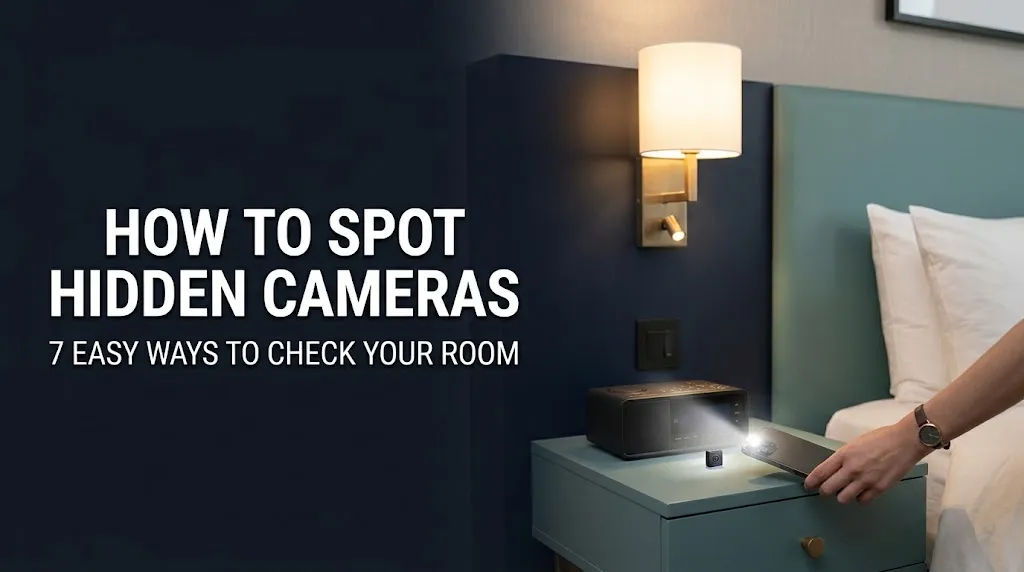
Staying in a hotel, booking a rental apartment, or visiting an unfamiliar place should not leave you worried about your privacy. Although most accommodation is used legitimately, unauthorized recording devices can sometimes be hidden inside ordinary objects.
Knowing how to find hidden cameras can help you check a room and make informed decisions about your safety. You do not always need expensive equipment to get started. A careful visual inspection, a flashlight, and a basic understanding of how cameras work can help you identify objects that deserve a closer look.
However, no single method can detect every hidden camera. Some devices record directly to a memory card, while others use Wi-Fi or infrared night vision. The most practical approach is to combine several inspection methods and avoid treating ordinary electronic devices as proof of surveillance.
In this guide, you will learn where to look, how to use your smartphone, what detector tools can do, and what steps to take if you discover a suspicious device.
Read Also : How to Get a NADRA Vaccination Certificate in Pakistan – Complete Guide
Why Should You Check for Hidden Cameras?
A hidden camera becomes a serious privacy concern when someone records people without proper authorization, especially in places where they reasonably expect privacy.
Bedrooms, bathrooms, changing areas, and other private spaces deserve particular attention. Travelers, renters, families, and people staying in unfamiliar accommodation may find a basic room inspection reassuring.
The goal is not to suspect every object in a room. Instead, look for specific signs, understand the limits of detection tools, and take reasonable action when something genuinely seems unusual.
1. Inspect the Room Carefully
A visual inspection is the easiest place to start. Many cameras need an unobstructed view of the area they are intended to record, so their position can provide useful clues.
Start by looking around the room at a normal pace. Pay attention to objects facing the bed, shower area, changing space, or another location where people expect privacy.
Common objects worth checking include:
- Digital clocks and alarm clocks
- USB chargers and power adapters
- Lamps and decorative accessories
- Smoke detectors and ceiling fixtures
- Picture frames and wall decorations
- Shelves, electronic devices, and unusual ornaments
- Objects with unexplained holes or small glass-like openings
Look for an object that seems out of place, has an unusual opening, or points directly toward a private area without an obvious reason.
A useful tip: Compare suspicious objects with similar items in the room. An unusual position or unexplained feature may justify a closer look, but it does not prove that a camera is present.
Do not open electrical equipment, damage fixtures, or remove smoke detectors. These actions can create safety risks and may damage legitimate property.
2. Use a Flashlight to Look for Camera Lenses
Some camera lenses produce a noticeable reflection when light reaches them at the right angle. A flashlight can help you examine suspicious objects more closely.
Follow these steps:
- Dim the room lights if it is safe to do so.
- Turn on your phone’s flashlight or use a small handheld flashlight.
- Slowly scan suspicious objects from different angles.
- Look for a small, distinct reflection that appears to come from a lens.
- Examine the object more closely without taking it apart.
A lens may produce a tiny glint that looks different from the surrounding surface. However, ordinary glass, screws, polished plastic, and decorative materials can create similar reflections.
For this reason, a single bright spot should never be treated as confirmation of a hidden camera. Look for additional evidence before reaching a conclusion.
3. Check for Infrared Light With Your Smartphone
Some cameras use infrared LEDs to record in low-light conditions. These LEDs may be difficult or impossible to see with the naked eye, but certain smartphone cameras can detect some infrared light.
Not every phone supports this method. Many smartphone cameras include infrared filters that block much of the light.
Here is a simple way to test your phone:
- Find a working infrared remote control, such as a television remote.
- Open your phone’s camera.
- Point the remote toward the camera and press a button.
- Check whether a light appears on your phone’s screen.
- If the phone detects the remote’s infrared signal, you can try scanning suspicious areas in a darkened room.
Some phones may work better with the front-facing camera, while others may not detect the signal at all.
Even if your phone can see infrared light, this does not mean it can identify hidden cameras reliably. Other electronics can emit infrared light, and many cameras do not use infrared illumination.
4. Check the Wi-Fi Network for Unknown Devices
Some wireless cameras connect to a local Wi-Fi network to transmit video. Checking the network may help you identify devices that you cannot immediately recognize.
If you have permission to access the network, open the router’s official app or administration page and review the connected-device list.
Look for unfamiliar device names or manufacturers. If a device seems unusual, check whether it could belong to a television, smart speaker, printer, security system, or another legitimate product.
You can also use a reputable network-scanning app to view devices connected to the same network, where permitted.
Keep these limitations in mind:
- Some cameras use a separate network.
- Some devices record locally without an internet connection.
- A camera may be connected to a different router.
- Device names do not always reveal what the hardware actually is.
- An unfamiliar device is not automatically a surveillance camera.
A network check is best used as an additional clue rather than a complete hidden-camera detection method.
5. Consider a Dedicated Hidden Camera Detector
If a visual inspection leaves you concerned, a dedicated detector may offer another way to investigate suspicious objects.
Different detectors work in different ways, so it is important to understand what each type can and cannot find.
| Detector Type | How It Works | Main Limitation |
|---|---|---|
| RF detector | Searches for certain radio-frequency transmissions | May react to routers, phones, and other electronics |
| Optical lens detector | Uses light and viewing filters to help reveal camera lenses | Requires the lens to be visible from a suitable angle |
| Smartphone detection app | Uses available phone features to look for possible clues | Cannot reliably detect every type of camera |
| Professional inspection equipment | Uses specialized methods to examine suspected surveillance devices | Results depend on the equipment and the inspector’s expertise |
Before buying a detector, read its specifications and understand which technologies it supports.
For example, an RF detector may not identify a wired camera or a camera that is switched off. An optical detector may not reveal a lens hidden behind an obstruction. No consumer detector can guarantee that a room is completely free of recording devices.
6. Learn the Warning Signs Without Jumping to Conclusions
A suspicious object usually deserves closer attention when several unusual features appear together.
For example, a device might have an unexplained lens-like opening, face directly toward a private space, and lack any clear purpose. These details may justify further investigation, but they still do not prove that the device is recording.
Use the following table as a practical reference.
| What You Notice | What It Could Mean | What to Do |
|---|---|---|
| A small glass-like opening | A lens or an ordinary reflective component | Examine it from different angles |
| An unfamiliar electronic device | A legitimate gadget or an unknown device | Ask the property manager about it |
| A device facing a bed or changing area | An unusual placement that deserves attention | Inspect it without dismantling it |
| An unexplained infrared light | A camera LED or another infrared source | Check with additional methods |
| An unknown device on Wi-Fi | An unfamiliar network-connected product | Identify the device before drawing conclusions |
The key is to look for evidence rather than relying on fear or assumptions.
7. What to Do If You Find a Possible Hidden Camera
Discovering an object that appears to be a hidden camera can be upsetting, particularly if it is located in a private space. Your first priority should be your safety and privacy.
Move Away From the Area
If you believe you may be recorded in a private space, leave the area if possible. Consider moving to another room or accommodation while you decide what to do next.
Document What You See
If it is safe and lawful, photograph the object and its surroundings. Record the location and the time you noticed it. Avoid touching or moving the suspected device because doing so could affect potential evidence.
Report the Concern
Depending on the circumstances, contact the property manager, accommodation provider, booking platform, or relevant local authorities.
If the object appears to be recording people in a bathroom, bedroom, or another highly private area without authorization, consider reporting it promptly to the appropriate authorities.
Avoid Destroying or Accessing the Device
Do not break the object, remove its storage card, or attempt to access its recordings. Preserve the scene as much as possible and let qualified professionals investigate.
If you face an immediate safety risk, prioritize leaving the location and seeking assistance.
Can Hidden Camera Apps Really Detect Cameras?
Many smartphone apps advertise hidden-camera detection, but their abilities vary considerably.
Some apps help users inspect a Wi-Fi network, while others rely on magnetic sensors or provide guidance for visual inspections. These methods do not all detect cameras directly.
A magnetic sensor, for example, may respond to electronic components or magnets in ordinary devices. It cannot reliably identify every camera. Similarly, an app that scans a network cannot find a camera that is not connected to that network.
Before installing a detection app, review its permissions, developer information, privacy practices, and recent user feedback. Be cautious of applications that promise to find every hidden camera with a single tap.
A phone can be a useful inspection tool, but it should not be treated as a substitute for a thorough physical check.
Common Myths About Hidden Camera Detection
Misleading advice can make people either unnecessarily anxious or overly confident in their equipment. Here are a few common misconceptions.
Myth 1: Every hidden camera has a visible red light.
Many cameras operate without a visible indicator. Some use infrared illumination, while others record in ordinary lighting without displaying an obvious light.
Myth 2: Turning off the lights reveals every camera.
Darkness may make certain reflections or infrared sources easier to notice, but it does not reveal every device.
Myth 3: A smartphone app can find all hidden cameras.
No ordinary smartphone app can guarantee complete detection. Results depend on the phone, the app, the camera technology, and the surrounding environment.
Myth 4: Every unknown Wi-Fi device is suspicious.
Smart televisions, speakers, thermostats, and other legitimate devices may appear unfamiliar on a network. Identify a device before assuming it is a camera.
Myth 5: A camera detector guarantees privacy.
Detection tools have limitations. A careful inspection using several methods is more useful than relying on one device alone.
Frequently Asked Questions
How can I find a hidden camera in a hotel room?
Begin with a visual inspection of objects facing private areas. Use a flashlight to examine suspicious openings, and consider checking for infrared light or reviewing the Wi-Fi network if you have permission. Treat each finding as a clue rather than proof.
Can I detect a hidden camera with my phone?
Your phone may help you identify lens reflections, detect certain infrared signals, or inspect network-connected devices. However, its capabilities depend on the hardware and software, and it cannot reliably detect every hidden camera.
Do hidden cameras work without Wi-Fi?
Yes. Some cameras record footage to internal storage or a memory card. Others may use wired connections or a separate network. This is why checking Wi-Fi alone is not enough.
Can a hidden camera record in the dark?
Some cameras can record in low-light conditions, and certain models use infrared illumination for night vision. Others need enough visible light to produce a clear image. Capabilities vary by model.
Are hidden camera detector apps reliable?
They can help with certain checks, but their effectiveness varies. Apps that rely on a phone’s sensors or network information cannot guarantee that a room is free of cameras.
What should I do if I find a camera in a private area?
Leave the area if necessary, document the device when safe and lawful, avoid tampering with it, and report the concern to the appropriate property representative or local authorities.
Final Thoughts
Learning how to find hidden cameras starts with knowing what to look for and understanding the limits of detection tools. A careful visual inspection, flashlight check, smartphone test, and network review can help you investigate suspicious objects without buying expensive equipment immediately.
Remember that no single method can guarantee that every camera will be found. Unusual objects and unfamiliar electronics are not proof of surveillance, so investigate calmly and avoid damaging property.
If you discover a device that appears to be recording people in a private space without authorization, prioritize your safety, preserve any potential evidence, and report the matter through the appropriate channels.
Your privacy matters. A systematic inspection and a sensible response can help you make better decisions when staying in an unfamiliar place.